
How to Demo a Product to Investors
Brian Nichols is the co-founder of Angel Squad, an angel investing community where aspiring and active angels learn from Hustle Fund’s approach, review curated deal flow, and connect with peers.
A product demo gives an investor something concrete to examine. A founder can still spend the meeting touring features while the investor has no idea who needs the product or why the result matters. A useful demo follows one user through one important job, shows a visible change, and leaves time for questions. Here is how to choose the format, build the run-of-show, protect customer data, and prepare a truthful backup.
What investors can learn from a product demo
A product demo is one piece of evidence in an investment decision. It can show whether the founder understands a user's workflow, what the team has built so far, and where the difficult product work sits. The way the founder explains tradeoffs can also reveal how clearly the team thinks about the product.
The demo leaves plenty unresolved. It cannot establish market size, durable demand, attractive economics, a defensible advantage, or a team's ability to execute for years. Our co-founder Eric Bahn's broader view is that “Pre-seed investing and seed investing is largely an exercise of assessing the potential of the founders.” The product gives the investor evidence for that assessment. It never completes it.
Early-stage companies often fail, including startups with polished products. Investors still need customer research, references, market work, and the rest of their diligence. Founders should treat the demo as a focused proof point rather than a miniature version of the entire pitch.
Choose the format for the product stage and meeting
The right format depends on what exists, how stable it is, and how much control the meeting allows. Choose the format that presents the product's current state truthfully.
- Live product: Use it for a stable workflow that fits the allotted time. Start from a prepared demo account and keep a recording of the same sequence ready.
- Recorded walkthrough: Use it for an asynchronous introduction, a large presentation, or a product that depends on unreliable connectivity, hardware, or third-party systems. Keep it short and be ready to answer what was edited out.
- Interactive sandbox: Offer it after the guided path when the product is safe and intuitive enough for exploration. A complex business tool may need more context before an investor can use it well.
- Clearly labeled prototype: Use a clickable design, simulated model output, or appearance prototype when that is the real stage. State which interactions work, which outputs are scripted, and what remains to be built.
Meeting context changes the timing. In its five-minute pitch format, Techstars assigns two to three minutes to the demo. Y Combinator says demos seldom work in modern Demo Day presentations, where a founder has to address a large audience under a tight clock. A one-to-one partner meeting can support a longer live walkthrough and interruptions.
Ask how much time you have before the meeting. If no one sets a limit, prepare a four-minute core path and hold deeper workflows for questions.
Build a four-minute problem, action, result sequence
The core path should move through four ideas in order: the user's problem, the product action, the observed result, and the investor's next question. That sequence keeps the demo centered on evidence rather than navigation.
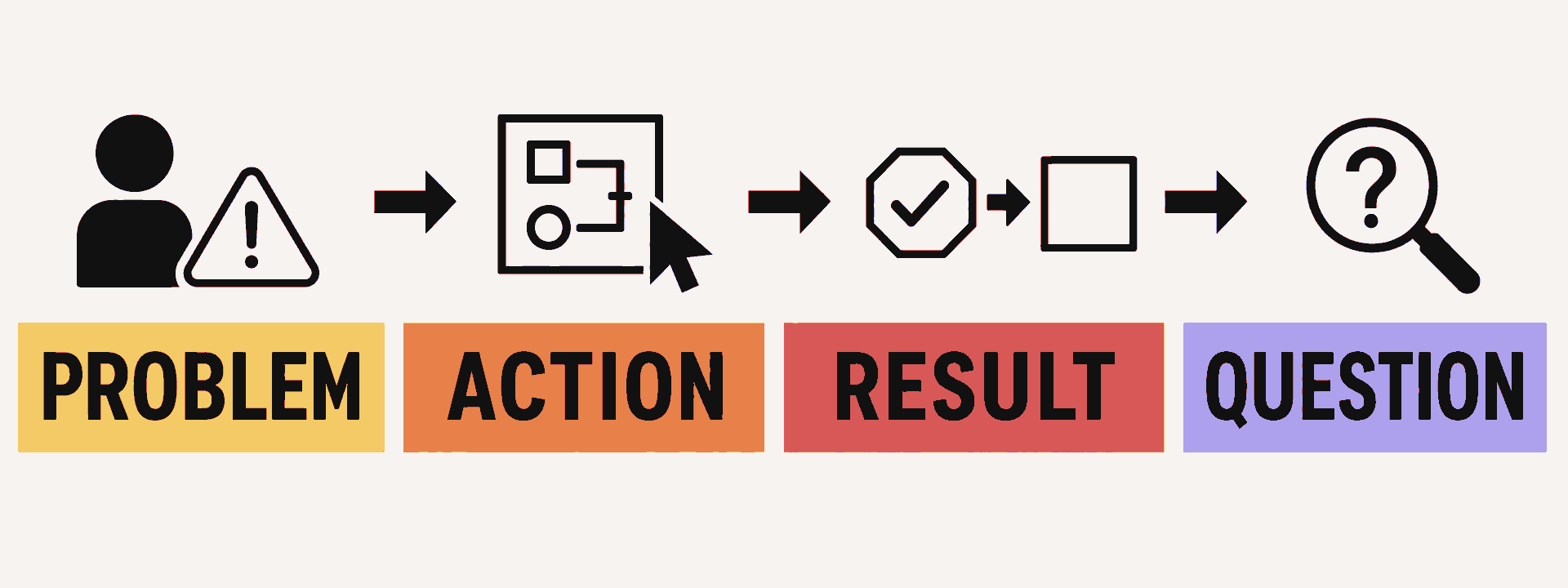
0:00–0:30: Name one user and one job
Give the investor a person, a starting state, and a reason to care. Skip the company history and feature inventory.
For a hypothetical property-management product: “A property manager receives hundreds of repeated tenant questions each week. I’m going to show you how one manager turns an incoming repair request into a scheduled vendor visit.”
Use a measured outcome only when you can support it. A claim that the process falls from three hours to 15 minutes needs a defined test or customer source behind it.
0:30–2:30: Perform the important action
Start at the first meaningful product state. Sign in before the meeting. Preload the right account. Close private tabs and notifications. Then complete the one workflow that best represents the product's value.
Narrate the user's decision and the product response. “The manager confirms the unit and assigns the repair” gives the investor more context than “I click this button.” Remove settings, profile pages, billing, and other screens that do not change the result.
If the technical breakthrough is the product, show it early. A legal document tool might upload a contract, identify a risky clause, and trace the output back to source text. The login screen can wait.
2:30–3:15: Show the changed state
Make the result visible. The repair has a vendor, a date, and a tenant notification. The contract review has a cited clause and an action for counsel. The hardware sensor detects the condition and triggers the expected response.
Describe only what happened in front of the investor. If part of the output was prepared by a person, a rules engine, or a scripted prototype, say so. Clear boundaries build a stronger conversation than implied automation.
3:15–4:00: State the boundary and stop
Close with what is live, what is unfinished, and the question the demo raises. For example: “You saw the production repair workflow. Vendor payments are still handled manually. Next, we are testing whether small property managers will pay for the full handoff.”
Then stop. The most useful part of the meeting may be the follow-up question.
Use realistic data without exposing customers
Empty states and filler text make it hard to judge whether the workflow fits a real user's world. A believable demo account should contain realistic roles, dates, records, and edge cases. That does not require putting customer information on screen.
Use one of these data sources:
- permissioned customer data with sensitive fields removed;
- anonymized data that cannot be traced back to a person or customer;
- a realistic synthetic dataset, clearly labeled as synthetic; or
- the founder's own data when it represents the workflow accurately.
Remove names, email addresses, financial details, health information, application programming interface (API) keys, internal URLs, and notification previews unless you have a legitimate reason and permission to show them. The Federal Trade Commission's data security guidance recommends keeping only the personal information a business needs and limiting access to it.
Synthetic data can prove that the workflow functions. It cannot prove that customers use the product. Say which type of data the investor is seeing so the evidence remains clear.
Rehearse the failure, too
A backup should preserve the same story as the live path. Record the four-minute sequence, take a small set of screenshots from its important states, and keep any hardware spare charged. Avoid introducing a new set of claims when switching formats.
Run this preflight before the meeting:
- confirm the demo account, permissions, and starting state;
- test the screen share, camera, audio, network, and external display;
- disable notifications and software updates;
- check every third-party service in the workflow;
- open the backup recording locally; and
- rehearse the switch in one sentence.
A useful recovery line is: “The live environment is not completing this step, so I’m switching to a recording of the same build. I’ll send the incident details after the meeting.” Then move on. The investor can separate the technical issue from the product evidence without sitting through five minutes of debugging.
For an unfinished product, show the working portion live and use the backup format for the rest. Label each change in format. Screenshots are a reasonable fallback and weak primary evidence of a working interaction.
Prepare for the questions the happy path hides
The guided path is supposed to work. Investor questions explore what happens around it. Prepare concise answers in five areas:
- Failure modes: What happens when data is missing, an input is wrong, or a user abandons the process?
- Dependencies: Which integrations, models, suppliers, or platforms does the workflow rely on?
- Scale: What changes when usage, file size, transaction volume, or geography grows?
- Manual work: Where is a person operating behind the product today, and what is the plan for that work?
- Access and security: Who can see, change, approve, or export sensitive information?
An early product can have unresolved answers. Name the current constraint, what you have observed, and the next test. “We have not tested 10,000 simultaneous files; our largest run is 1,000, and the queue took eight minutes” is useful. A vague promise that the system will scale is not.
Investors can use our pitch-meeting questions to move from the workflow into customers, competition, and market focus. For a deeper product review, our guide to evaluating a startup's product adds hands-on testing and customer research.
Separate product function from user validation
A successful click path shows that the feature worked in the demo environment. User validation requires separate evidence. Place that evidence after the result so the investor can tell which claim each fact supports.
Useful validation includes:
- the number and type of users who completed the workflow during a defined period;
- how often they repeated it;
- what they did before adopting the product;
- whether they paid, renewed, expanded, or referred another user; and
- how the team learned about the behavior.
Define the unit, date range, and source. A hypothetical claim such as “From September 1–30, 2026, product logs show that 18 of 23 customer accounts with at least one login used the workflow at least once” is more useful than “customers love this feature.” If the number comes from interviews rather than product logs, say that. If the example represents a pilot rather than broad adoption, say that too.
The distinction protects both sides. The founder avoids stretching one piece of evidence across several claims, and the investor gets a cleaner record for diligence.
Close with evidence and open questions
End the demo with four plain statements:
- What worked: Name the workflow the investor saw.
- Who uses it: Give a dated, defined adoption fact if one exists.
- What remains: Disclose the manual, simulated, unstable, or unbuilt part.
- What comes next: Name the test, milestone, or diligence question that follows.
For the same hypothetical startup, a clean close sounds like this: “You saw a manager turn a repair request into a scheduled visit. From September 1–30, 2026, product logs show that 18 of 23 customer accounts with at least one login used the workflow at least once. Vendor payments remain manual. Our next test is whether owners with fewer than 100 units use it often enough to support our planned price.” Every statement has a different job.
Investor demo review checklist
Hustle Fund co-founder Elizabeth Yin writes in Democratizing Knowledge, “The more disciplined you are in your thought process/rubric, the more you can improve over time.” Our 5T investment framework covers the broader startup decision. A consistent demo review keeps a polished presentation from carrying more weight than the evidence deserves.
After the demo, record:
- User: Could you name the specific user and job?
- Stage: Did the founder distinguish live, recorded, simulated, and unbuilt parts?
- Workflow: Did the core action work from a credible starting state?
- Result: Was the user's changed state visible and meaningful?
- Data: Was the dataset realistic, safely handled, and accurately labeled?
- Validation: Did the founder separate product function from customer adoption?
- Boundaries: Did the founder understand failure modes, dependencies, manual work, and scale limits?
- Open diligence: Which claim needs customer calls, technical review, references, or market work?
A sharp demo can earn a deeper conversation. The checklist tells the investor what that conversation needs to resolve.









.png)